- AI Agents
- Copilot Studio
- PowerApps
- FastAPI
- Python
How I Built 1Pager
From Chaos to Structure: Scaling PDF-to-XML Conversion Across 100+ Legal Formats
1Pager is a legal document PDF to XML conversion system built with Copilot Studio. The challenge? Supporting 100+ venues, each with their own formatting requirements.
The Problem
Working with legal documents from different venues meant handling unique formats at scale. Each of the 100+ venues had consistent internal structure but different layouts and requirements. Without direct instructions or API specifications, I had to reverse-engineer the output format using golden samples.
First Approach: Global Instructions
My initial instinct was straightforward:
- Create global instructions covering all venues
- Add venue-specific rules within the same agent
- Keep everything centralized in the main agent instructions
The Issue: As the instruction set grew, the agent started hallucinating. With too many venue rules loaded at once, it couldn't effectively apply them and would generate inconsistent results.
Second Approach: Dynamic Venue Configuration
I completely restructured the solution:
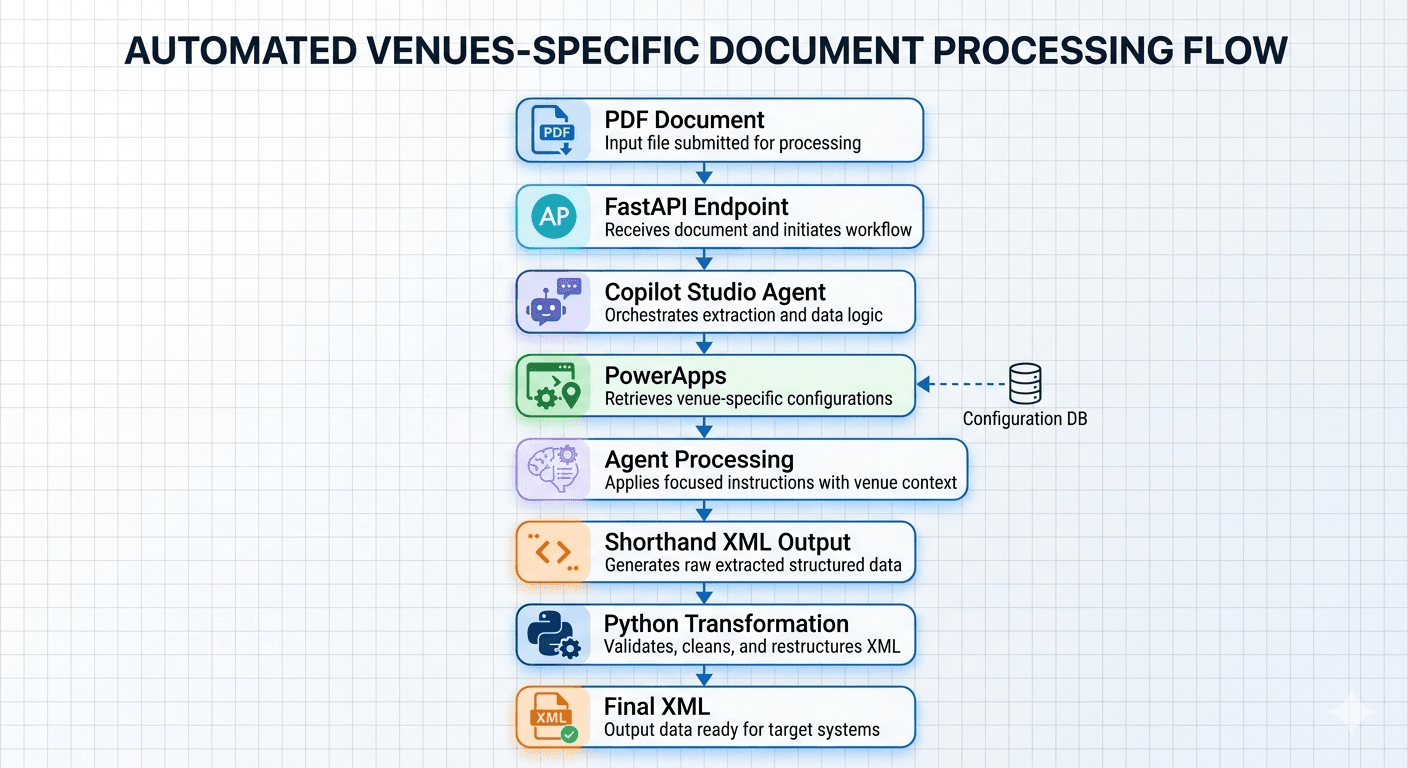
PowerApps Table: Created a table with venue as the key, storing:
- Example outputs for each venue
- Venue-specific instructions
- Shorthand XML templates
Smart Flow: Built a flow that retrieves only the relevant venue's example and instruction, creating a focused prompt
Agent Prompt: Loaded the targeted instructions into the agent—dramatically improving accuracy since it only needed to handle one venue at a time
Shorthand XML: Due to character limits in PowerApps tables, I used a compressed XML format returned by the agent
Python Transformation: A Python script transforms the shorthand XML into the final, full XML format
FastAPI Bridge: Created an API endpoint using FastAPI that acts as the bridge between external systems and the Copilot Studio agent, communicating via DirectLine
The Flow
Key Takeaways
- Divide and Conquer: Breaking a complex problem into venue-specific chunks made the AI agent more reliable
- Character Limits Matter: Working within platform constraints (PowerApps table size) requires creative solutions like shorthand formats
- Transformation Layers: Sometimes post-processing with Python is better than trying to do everything in the AI agent
- External APIs: FastAPI gave me a clean way to integrate Copilot Studio into a larger system
This architecture scales because each venue only loads what it needs, avoiding the hallucination problems of the first approach.
What I Would Improve Next
The next step is to make reliability measurable: keep a versioned test set for every venue, run each configuration against its golden sample, and record validation failures before a change reaches production. That turns prompt changes from guesswork into a repeatable engineering process.
If you are working through a similar document-automation or AI workflow problem, connect with me on LinkedIn. I’m always interested in the constraints behind difficult systems.
How did this land?
A tiny signal is enough—no account needed.